Trusted by 10,000+ users worldwide

Ultimate Disk Clone Solution – Easy, Secure & Efficient

Whether upgrading to an SSD or backing up your entire system, complete hard drive migration in just a few clicks with zero data loss.

law showcase 2 cover
gallery 19
testimonial skip 01

2K+

4.9/5

From 2,170+ reviews

High Speed

Up to 50% faster

Ultimate Disk Clone Solution - Easy, Secure & Efficient

100% Security

No data loss uaranteed

Windows 11, 10, 8.1, 8, 7

Why Choose Our Disk Cloning Tool?

A complete set of disk management functions to make data migration and backup incredibly simple and secure.

Disk Clone

1:1 perfect replication of the entire hard drive. Ensures new drive contents are exactly the same as the old one, including OS, partitions, files, and applications.

System Migration (Pro)

Seamlessly migrate Windows OS to a faster SSD or new hard drive with one click. Instantly enjoy significant performance boost without reinstallation.

Partition Clone

Flexibly select and clone individual or multiple partitions. Efficiently back up important data or move specific partitions to other hard drives.

100% Security Guarantee

Sector-by-sector cloning technology ensures flawless cloning process with no data byte lost. Your valuable information remains completely safe and secure.

Disk ClonHigh-speed & Efficiente

Optimized cloning algorithm fully leverages hardware performance, completing cloning tasks at astonishing speed, saving your precious time.

Wide Compatibility

Fully supports various storage devices including HDD, SATA SSD, M.2 SSD, NVMe SSD, and compatible with all major file systems.

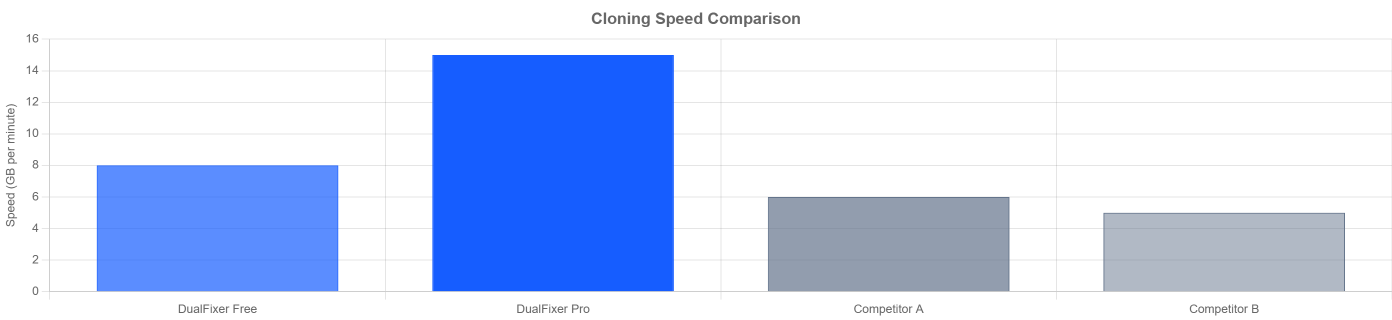
Cloning Performance That Stands Out

Our optimized algorithm delivers faster cloning speeds compared to competitors.
speed

Meet All Your Hard Drive Needs

Whether you’re a personal user or technical expert, our tools provide reliable support in various scenarios.

Upgrade to SSD

Upgrade to SSD

Give your old computer a new lease of life. Clone system drive from traditional HDD to high-speed SSD for transformed performance.

Upgrad Now ->

Expand Storage

Expand Storage

Give your old computer a new lease of life. Clone system drive from traditional HDD to high-speed SSD for transformed performance.

Expand Storage ->

180 800x600 1

Create Backup

Prevent problems before they occur with regular full disk clones. Quickly restore all data in case of virus attacks or hardware failures.

Create Backup ->

Simple as ABC: 3 Steps to Clone

Extremely simple operation procedure, easy for even novice computer users to get started.
Select Source Disk

Launch the software and select the original hard drive (source disk) from the clear disk list.

Upgrade to SSD

Select Target Disk

Select a hard drive (target disk) for receiving data. Software automatically checks for sufficient space.

Expand Storage

Preview & Start

Preview final layout of cloning operation. Confirm no errors, click “Start Cloning” and let us handle the rest.

180 800x600 1

Choose the Version That Suits You

Free version for basic needs, and more powerful professional version to unlock all
potential.

Free Plan

Perfect for basic cloning needs

$0

forever

Disk cloning
Partition cloning
4K alignment (SSD optimization)
Adjust target partition size
7×24 hour priority technical support
Standard cloning speed
System migration
Bad sector skipping

Most Popular

Pro Plan

All features for power users

$9.9

/month

Disk cloning
Partition cloning
4K alignment (SSD optimization)
Adjust target partition size
7×24 hour priority technical support
Standard cloning speed
System migration
Bad sector skipping

30-day money-back guarantee

What Our Customers Say

Hear from satisfied customers who experienced our product quality and value.

“DualFixer Clone keeps my client files secure with easy auto-backup. Setup was simple, and their fast support fixed my restoration issue in no time. Essential for small business owners!”

gallery 06

Sarah Johnson

Small Business Owner

“DualFixer Clone recovered all my accidentally deleted family photos quickly. Intuitive interface, no lag-way better than other tools I’ve tried. Highly recommend!”

trees 02

Michael Chen

Home User

“DualFixer’s student discount made this a no-brainer. Syncs my college projects across devices flawlessly. Support even helped during finals week-top value!”

gallery 07

Emily Rodriguez

Student

Frequently Asked Questions

Find answers to commonly asked questions about our products and services.

Ready to Experience Seamless Hard Drive Upgrade?

Download the free version immediately, or choose the more powerful professional version to give your computer a fresh new look.

100% Secure Download

No Adware or Malware

24/7 Customer Support